Articles - Page 4 - RD3 Tech

Where Did I Put That File? A Simple Guide to Organising Your Digital Life

How to Organise Your Digital Files

Most people don’t really have a file-storage problem.

They have a finding-things problem.

You know the document exists. You just can’t remember whether it’s in Downloads, Documents, on the Desktop, in Google Drive, OneDrive, iCloud or attached to an old email.

The answer isn’t necessarily to create hundreds of folders.

In fact, that can sometimes make things worse.

Keep the Structure Simple

I’d start with a simple structure that reflects the way you actually use your files.

For example:

Work

  • Clients
  • Finance
  • Projects

Personal

  • Documents
  • Photos
  • Important Records

Archive

  • Older information you don’t regularly need

The exact structure isn’t important. It needs to make sense to you.

You might prefer organising by client, year, project or type of document. There isn’t one perfect filing system — the important thing is being able to find something again without having to remember exactly where you put it.

Give Your Files Useful Names

File names are just as important as folders.

Something called “Document1-final-new.pdf” isn’t very helpful six months later.

Something like “Insurance – House – 2026.pdf” tells you much more.

A useful file name should give you enough information to recognise the file without having to open it. For some documents, including a date, client name or project name can make searching much easier.

Don’t Use the Desktop as Permanent Storage

I’d also avoid treating the Desktop as permanent storage.

It’s useful as a temporary working area, but once everything ends up there, it becomes another filing cabinet — except without much of a filing system.

If you regularly find yourself with dozens of files covering the entire Desktop, it might be time to move them into a structure that makes more sense.

Organisation Isn’t Backup

There’s one other important point: organisation isn’t backup.

Having a beautifully organised folder that exists on one computer doesn’t protect you if that computer fails, is lost, is stolen or suffers a drive failure.

A sensible file system should work alongside a sensible backup strategy.

That might involve cloud storage, an external drive, or a combination of different backup methods. The important thing is that your important files exist somewhere other than just the computer you’re currently using.

You Don’t Have to Do It All at Once

You don’t have to reorganise your entire digital life in one weekend either.

Start with the files you use most often. Create a simple structure, tidy the areas that cause you the most frustration and gradually work through the older material.

You may even find that once the main problem areas are sorted, the rest becomes much easier to deal with.

The best filing system is one you’ll actually keep using.

If your files have become difficult to manage, RD3 Tech can help you work out a practical structure and a sensible way forward — without trying to reorganise everything at once.
Behind the Scenes: The Technology Stack Behind the RD3 Tech Website

How the RD3 Tech Website Works Behind the Scenes

A website can look quite simple from the outside.

You see the pages, menus, images and contact forms. What you don’t see is the collection of different technologies and services working behind them.

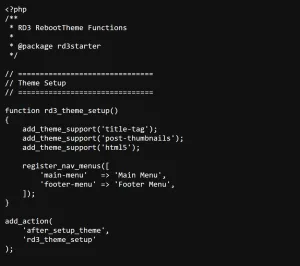
The RD3 Tech website is built using WordPress as its content management system, with a custom RD3 Starter Theme providing the foundation for the site’s design, layout and structure.

There is also custom PHP, CSS and JavaScript where they provide something useful, rather than adding another plugin simply because one happens to exist.

The site uses custom functionality for things such as forms, content management and other parts of the website. External services are then used where they make sense, rather than trying to make the website do everything itself.

Keeping Development Under Control

GitHub is also part of the development workflow. This allows changes to the website code to be managed, tracked and reviewed rather than simply editing files and hoping everything continues to work afterwards.

This becomes particularly useful as a website grows. When something changes, there is a clearer record of what was changed and why. It also makes it easier to work on improvements without losing track of previous versions.

More Than Just the Website

There are also systems outside the website itself.

Google Workspace handles business email and related services. Google Forms and Apps Script are used for parts of the enquiry process, while structured configuration such as JSON helps keep some application logic separate from the data it uses.

This means the website isn’t operating in isolation. It is part of a wider system where different services have different jobs.

The Infrastructure You Don’t Normally See

Then there is the infrastructure that most visitors never see — hosting, DNS, email authentication, security and the connections between the different services.

These systems can be invisible when everything is working properly. When something goes wrong, however, they can suddenly become very important.

An email might not arrive because of an authentication problem. A form might fail because two systems can no longer communicate correctly. A website might be working perfectly while a DNS problem prevents someone from reaching it.

Good technology is often about making sure these individual pieces work together reliably.

Technology Should Have a Purpose

None of these technologies are particularly useful simply because they are technically interesting.

They are useful when they help the website achieve something.

That might mean making it easier for someone to contact RD3 Tech, making the site easier to maintain, improving reliability, reducing unnecessary complexity or allowing the system to grow without needing to rebuild everything from scratch.

The same principle applies to technology in a business. The goal shouldn’t be to use the most complicated or newest technology available. It should be to use the right technology for the job.

A Website Is More Than What You See

A good website isn’t just about how it looks. It’s about how well all the pieces work together.

If your business website has become difficult to maintain, your online services have grown complicated, or you’re simply not sure how the different pieces of your technology setup fit together, RD3 Tech can help you look at the bigger picture.

Sometimes the best solution isn’t another plugin or another piece of technology. Sometimes it’s simply understanding what you already have and making it work better.