Category: Community Alerts - RD3 Tech

Great News for Windows 10 Users!

Great News for Windows 10 Users! 

Microsoft has officially extended Windows 10 Extended Security Updates (ESU) for consumers through 12 October 2027! 

But what exactly is ESU?

Extended Security Updates (ESU) is a program that allows Windows 10 to continue receiving important security patches after its official end of support. These updates help protect your PC from newly discovered security threats and vulnerabilities.

What ESU includes:

  • ✅ Critical and important security updates.
  • ✅ Continued protection against new security risks.

What ESU does not include:

  • ❌ New Windows features.
  • ❌ General bug fixes or performance improvements.
  • ❌ Free technical support from Microsoft.

This is great news if:

  • 💻 Your PC isn’t compatible with Windows 11.
  • 💻 You’re not quite ready to replace your computer.
  • 💻 You need a little more time before upgrading.

While ESU helps keep your PC secure, it is only a temporary solution. Moving to Windows 11 or replacing older hardware remains the best long-term option.

Not sure what your computer supports?

RD3 Tech can help you:

  • 🔹 Check if your PC can run Windows 11.
  • 🔹 Upgrade your existing PC.
  • 🔹 Explain your ESU options.
  • 🔹 Recommend the most cost-effective path forward.

Get in touch if you’d like help deciding what’s best for your computer.

 

TV Not Working? Phone Playing Up?

📺 TV Not Working? 📱 Phone Playing Up?

Here’s What RD3 Tech Can Help With.

One thing we’re working hard on at RD3 Tech is being clear about the services we provide.

Technology today can be confusing because devices, networks, apps, accounts, and cloud services all work together. Our focus is helping people and organisations get those systems working reliably.

✅ We can help with:

  • Home and business Wi-Fi issues
  • Internet connectivity problems
  • New computer setup and migration
  • Microsoft 365 setup and support
  • Google Workspace setup and support
  • Email configuration and troubleshooting
  • Printer and scanner setup
  • Smart home device connectivity
  • Streaming device setup (Chromecast, Fire TV Stick, Apple TV, etc.)
  • Data transfers between devices
  • Backup and cloud storage solutions
  • Device security and best practices
  • Technology advice and training
  • Small business and community group IT support

❌ We do not repair:

  • TV screens, panels, or display faults
  • TVs that won’t power on due to hardware failure
  • Internal TV component faults
  • Antenna and television reception repairs
  • Mobile phone screen replacements
  • Mobile phone battery replacements
  • Charging port repairs
  • Water-damaged devices
  • Tablet screen replacements
  • Soldering and component-level electronics repairs
  • Console hardware repairs (PlayStation, Xbox, Nintendo)
  • Appliance repairs
  • Whiteware repairs
  • Electrical wiring work
  • General electronics repair work
  • Warranty repairs on behalf of manufacturers

Our focus is on IT support, networking, software, cloud services, device setup, cybersecurity, and helping people get the most out of their technology.

If your issue involves getting devices connected, accounts configured, software working, data transferred, or technology systems running smoothly, there’s a good chance we can help.

If you’re unsure whether a job is within our scope, send us an email.

Even if it’s not something we do, we’ll do our best to point you in the right direction.

RD3 Tech – Helping people and organisations make technology work better.

STAY SAFE & PROTECT YOUR TECH 🌀

🌀 Stay Safe & Protect Your Tech 🌀

With the cyclone approaching, please take care of yourselves, your homes, and your technology.

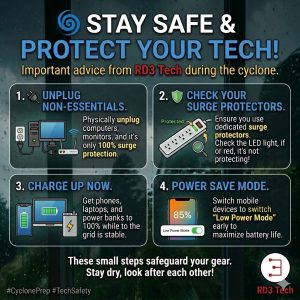
Severe weather can bring power outages, voltage fluctuations, and power surges that can damage computers, networking equipment, televisions, and other electronics. A few simple steps now can help reduce the risk of damage and make things a little easier if the power goes out.

🔌 Unplug Non-Essential Equipment

The most reliable way to protect electronic equipment from a significant power surge is to physically unplug it from the wall.

This includes computers, monitors, televisions, printers, gaming consoles, and other non-essential equipment. Don’t forget about your modem, router, and other networking equipment if you can manage without internet access during the storm.

If severe weather is approaching and you don’t need a device running, switching it off and unplugging it is a simple precaution.

🛡️ Check Your Surge Protection

If you need to keep equipment connected, make sure it is plugged into a proper surge protector rather than just a standard power board or multi-plug.

Many surge protectors have an indicator light showing whether their surge protection is still active. Check the instructions for your particular unit to understand what the indicator means.

👉 Pro Tip: Surge protectors can wear out over time, particularly after experiencing significant surges. If your protector indicates that its protection has failed, replace it rather than continuing to rely on it.

🔋 Charge Up While You Can

While the power is still stable, charge your phones, laptops, tablets, power banks, and other essential battery-powered devices.

Having a fully charged phone can be particularly important if there is a prolonged power outage or you need to contact family, emergency services, or your power provider.

📱 Save Your Battery

Once the power goes out, conserve your battery wherever possible. Turn on Low Power Mode or Battery Saver, reduce screen brightness, and close apps you aren’t using.

If mobile coverage is available but you don’t need to use your phone, limiting unnecessary activity can help stretch that battery further.

💾 Protect Your Data

If you have important work or personal files open, save them before the weather gets worse. If possible, make sure important files are backed up to a reliable cloud service or another storage device.

A power outage can be inconvenient, but losing important photos, documents, or business data can be much more serious.

⚡ When the Power Comes Back

When power is restored after an outage, it can sometimes be unstable for a short period. You don’t necessarily need to switch everything back on immediately.

If you have unplugged your equipment, consider waiting until power appears stable before reconnecting your more valuable electronics. Turn equipment back on gradually rather than reconnecting everything at once.

Most importantly, don’t put yourself at risk to protect your technology. Your safety comes first. If conditions are dangerous, leave the equipment alone and deal with it once it is safe to do so.

These small steps can make a big difference in reducing the risk of damage to your equipment and keeping you connected when you need it most.

Stay safe, stay dry, and look after each other! 🤝

All the best,
RD3 Tech